Monitor Submitted Permit Status
note
Before you begin, please ensure you are logged in to WorkFx. If you need help, see the WorkFx login guide.
Overview
This page explains how users can monitor the status of submitted Job Permit and Permit To Work applications.
Steps
1: Access Permit Application
- Please apply the Job Permit Application step 1-2 before proceeding with these steps.
- Follow the shared navigation to open the permit application area and the Apply menu.
- Job Permit
- Permit To Work
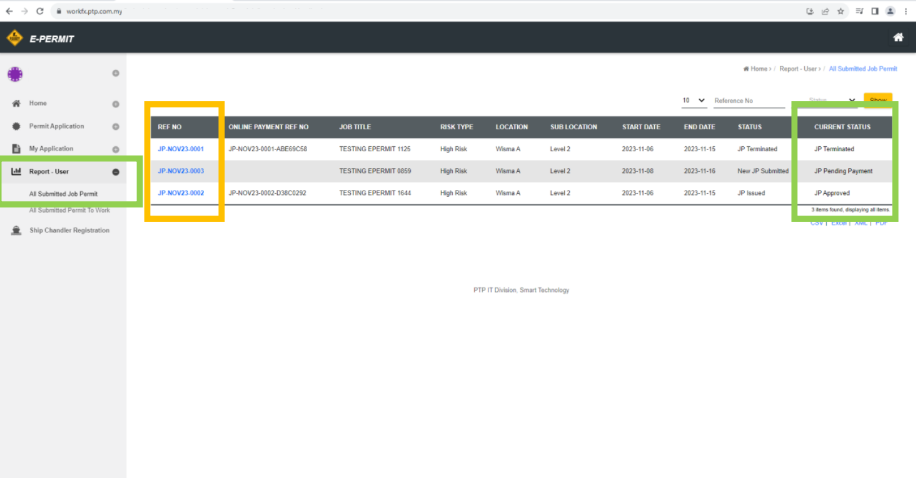
2: Open All Submitted Job Permit
- Click
All Submitted Job PermitunderReport-Userin the left menu.
note
- User can refer to the
Current Statusfield to view the current status of submitted job permits.- User can view application details by clicking on the Job Permit reference number.
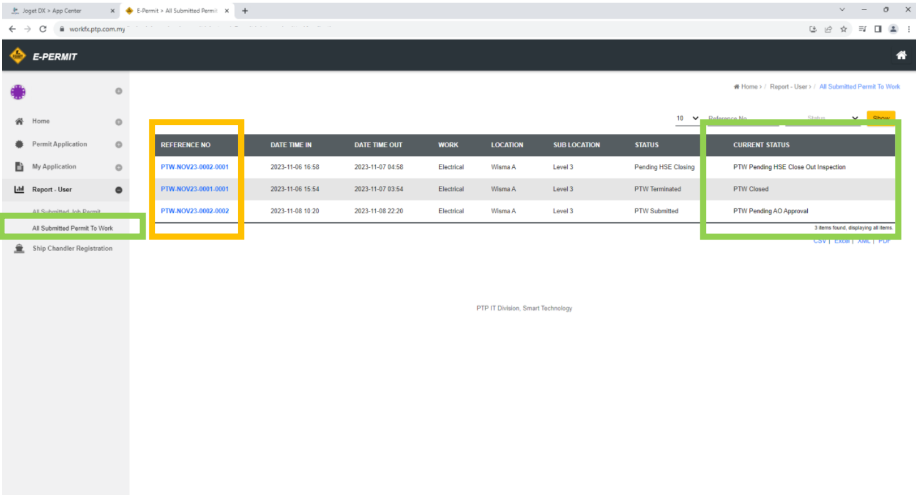
2: Open All Submitted Permit To Work
- Click
All Submitted Permit To WorkunderReport-Userin the left menu.
note
- User can refer to
Current Statusto check the PTW status.- User can view application details by clicking the PTW reference number.
info
This page reuses shared navigation steps from Job Permit Application to avoid duplication.
Related Guides
- Job Permit Application — Submit a Job Permit application.
- Permit To Work Application — Submit a Permit To Work application.
- List of Action required in application — Review required actions and draft permits.
- Ship Chandelling Work Activity Access Request — Request Ship Chandelling work access.