Ship Chandelling Work Activity Access Request
note
Before you begin, please ensure you are logged in to WorkFx. If you need help, see the WorkFx login guide.
Overview
This page explains how to request access to Ship Chandelling work activity.
Steps
1: Access Permit Application
- Please apply the Job Permit Application step 1-2 before proceeding with these steps.
- Follow the shared navigation to open the permit application area and the Apply menu.
2: Open Ship Chandler Access Request
- Click
Ship Chandler Registrationon the left menu.
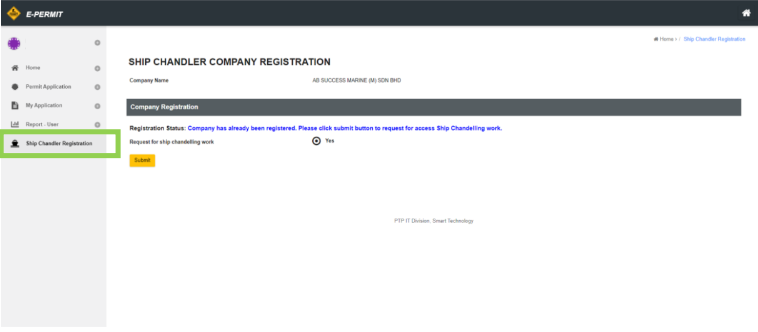
Access Status and Actions
| Registration Status | Action |
|---|---|
| Company has already been registered. Please continue to apply for ship chandelling work | Can continue apply for ship chandelling work |
| Company does not exist. Please contact: [email protected] or contact no: 07-5042222 ext: 7794 / 3374 / 7757 for registration process | Contact AR Team to register company under PTP |
| Company has already been registered. Please click submit button to request for access Ship Chandelling work | Click on button to request access for ship chandelling work |
| Application has been made. Please wait for registration process by admin | Waiting admin to add your company to access ship chandelling work |
| Company has already been registered and inactive | Click on button to request activate your company |
| Company has already been registered. Please wait for activation by admin | Waiting admin to activate your company |
note
When in doubt contact AR Team for registration assistance.
Related Guides
- Job Permit Application — Submit a Job Permit application.
- Permit To Work Application — Submit a PTW application.
- Monitor Submitted Permit Status — Check permit submission status.
- List of Action required in application — Review pending permit actions and workflows.